Mirror Suite · AMS Studio · Luxembourg

Available — try it free on your own plans

From the PDF plan to the building, the take-off and the bill of quantities.

CadMirror redraws the architect's plan as walls, doors and windows, builds the 3D, counts the quantities and writes the tender dossier. Windows software for engineering firms, contractors and project owners — and the original plan is never modified.

Published by AMS STUDIO S.à.r.l., Luxembourg Windows 10 and 11 Your plans stay on your computer Yearly subscription, no commitment beyond
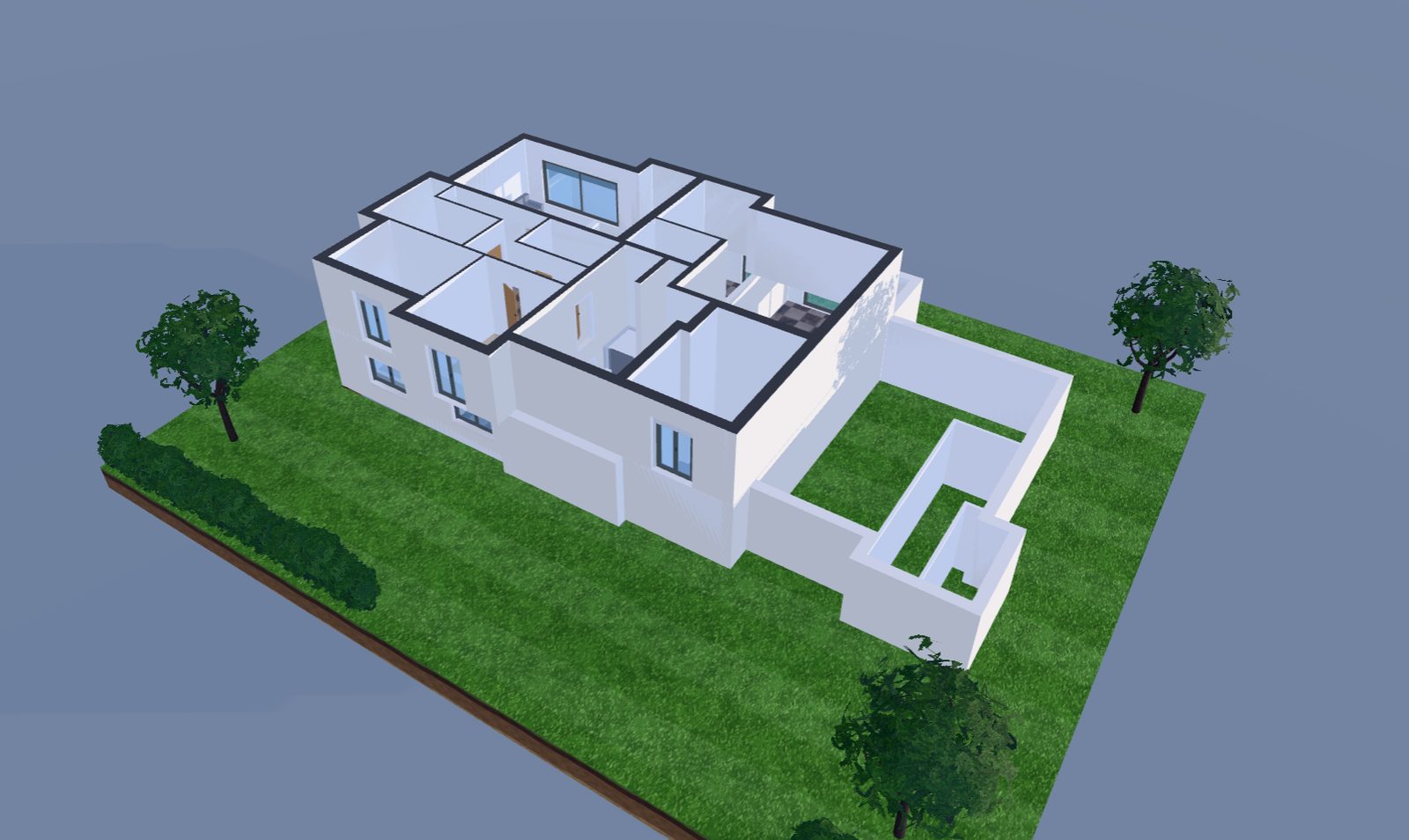
The 3D of a residence drawn in CadMirror
The architect's plan, built in 3D. Walls, slabs, openings and terrain, taken from the PDF plan and kept up to date with every line.
BuildRecognise3D and renderingMeasureConsultationSurveyPrint

One software, the whole chain

From the on-site survey to the tender comparison, without switching tools.

What you measure on site, what you draw at the office and what you send to contractors speaks of the same rooms, the same walls, the same quantities.

01

Survey

Rooms, their walls and openings, measured on site with the iPhone or iPad.

02

Build

The PDF plan becomes a building: layered walls, slabs, doors, windows, roof, stairs.

03

See

The 3D stays up to date next to the plan, with sections, elevations and realistic rendering.

04

Take off

Quantities come out of the model, or are measured on the plan with labels per room.

05

Tender

The bill of quantities is written from the take-off, in CRTI-B format or as a DPGF, and goes out to contractors.

06

Compare

Tenders received are compared item by item; the plan prints with its title block.

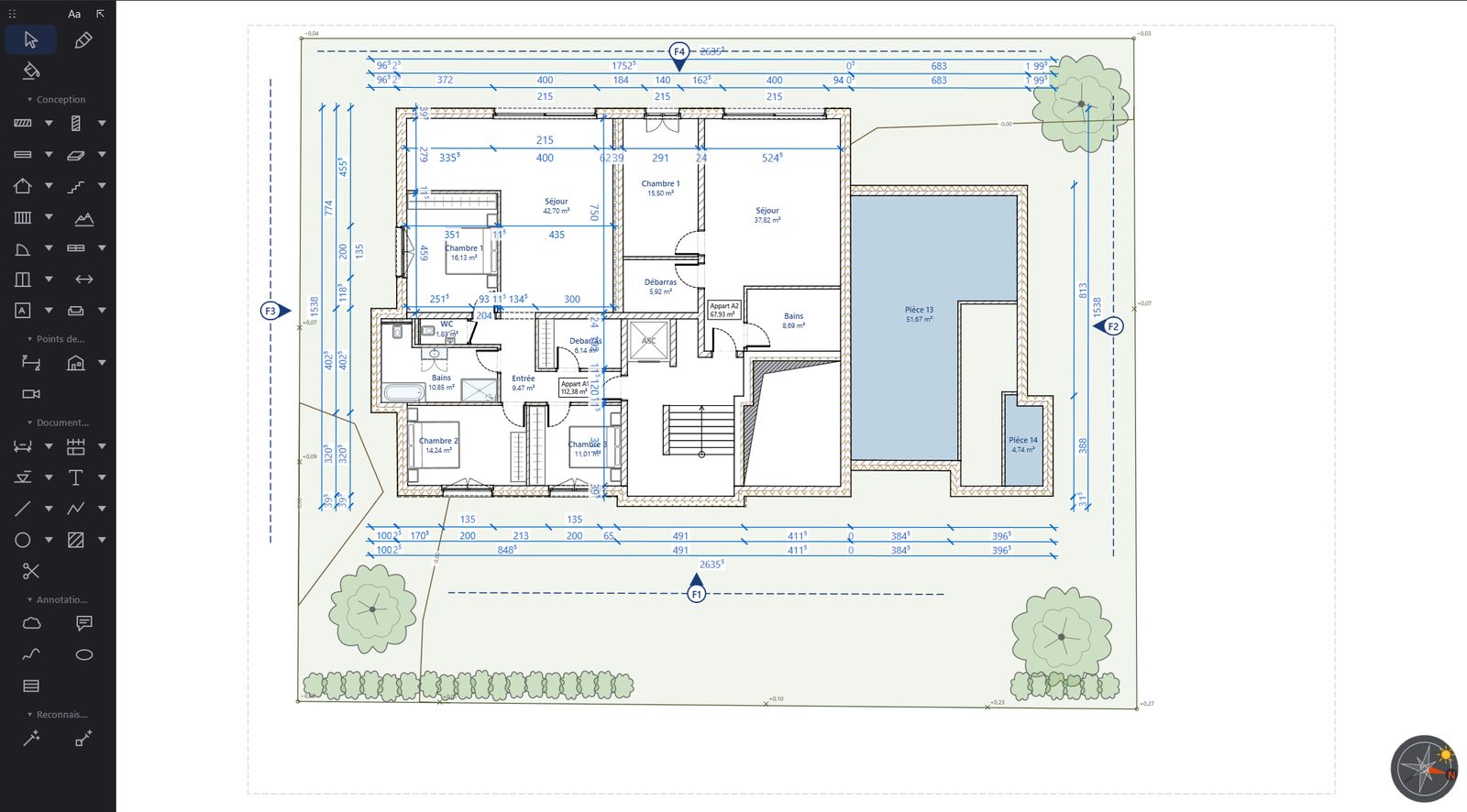
A residence plan redrawn in Build
The plan redrawn as real elements. Layered walls, openings, chained dimensions and terrain, laid over the original PDF.

Build · full edition

The architect's plan, redrawn as real building elements.

  • Walls at their thickness, drawn on the outer face, the axis or the inner face; corners and T-junctions join by themselves, a length can be typed on the keyboard.
  • Layered walls and slabs — concrete, block, brick, insulation, board, render — each with its hatch on the plan and its volume in the take-off.
  • Complete doors and windows: sashes, frame and architraves, fixed and opening frames at their thicknesses, reveal, sill, window board, shutters.
  • Storeys, roofs, stairs, railings, terrain: the stair follows Blondel's rule, the roof is drawn with one, two or four pitches with its valleys.
  • Parametric furniture and sanitary fittings, and a library of real 3D models — trees, plants, seats, lights — placed at their real size.
  • Chained and automatic dimensioning of each façade, attached to the walls and to the jambs of the openings.
  • The PDF is never touched: the project lives in a file next to the plan, and reopens just as you left it.
1Frame the plan alone, without the title blockvisible area

2Read: walls, layers, doors, windows, openingsClaude

3Snap each wall to the lines of the PDFto the millimetre

✓46 walls · 18 doors · 14 windows proposedto validate

The result arrives in orange: validate everything, or element by element.

Recognise · full edition

An architect's plan is read, not retraced.

  • Recognise everything with Claude: the plan is read zone by zone as a draughtsman would, then each wall is snapped to the exact lines of the PDF, with its layers and openings.
  • Your key, your images: you need your own Anthropic API key; only the images of the displayed area are sent, a few cents per area on your account.
  • The wall wand, without AI: show a wall by dragging a rectangle across it, CadMirror finds every wall with the same thickness and the same hatch, and builds them all at once.
  • Everything stays a proposal until you have validated it, and Ctrl + Z removes in one go what a gesture has built.
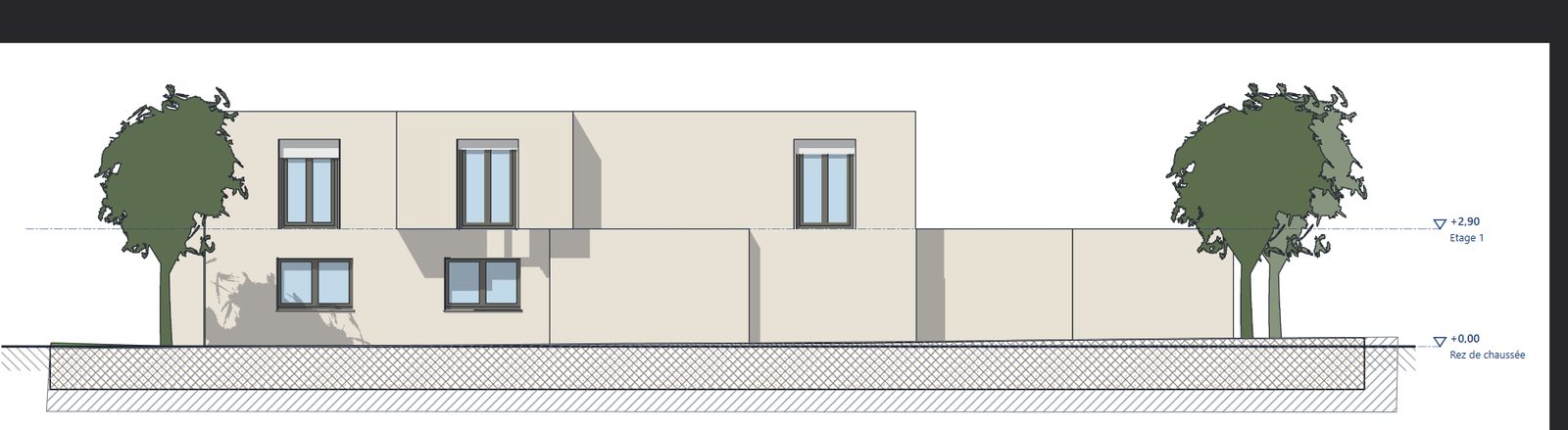
A residence's elevation drawn from the 3D model
The elevation, drawn from the model. Levels, shadows and planting, updated with every change to the plan.

3D and rendering · full edition

The 3D, sections and elevations follow every line of the plan.

  • All storeys stacked at their level, one eye per storey to hide those you don't want to see; a click in the 3D selects the element on the plan.
  • Sections and elevations in three clicks, updated with every change, with the layers of walls and slabs.
  • Eye-level camera placed on the plan, and realistic ray-traced rendering: physical sky or 360° photographed sky, reflective glazing, cast shadows.
  • AI perspectives, with your OpenAI, Google or Stability AI key: the 3D view becomes a furnished image based on the plan; only the images leave, never the project.
A room outlined, the “Bedroom” label picked from the list, the colour switched to green. Area, perimeter and subtotals follow on their own.

Measure · Métré and full editions

Take off a plan to scale, or let the model count.

  • Dimensions, perimeters, areas, counts on a plan scaled once: 1:100, 1:50, or two points whose distance you know.
  • One label per measurement, taken from your list of rooms and work items, with its families, colours and trades.
  • The model's take-off: rooms, walls face by face with openings deducted, joinery, slabs, objects — without tracing anything, and sent to Measure in one click.
  • Take-offs stay inside the PDF, as standard annotations that Acrobat and Bluebeam read; take-offs made in PDF Mirror open as they are.
  • CSV and Excel exports and your own templates, take-off book as a PDF, one page per label.
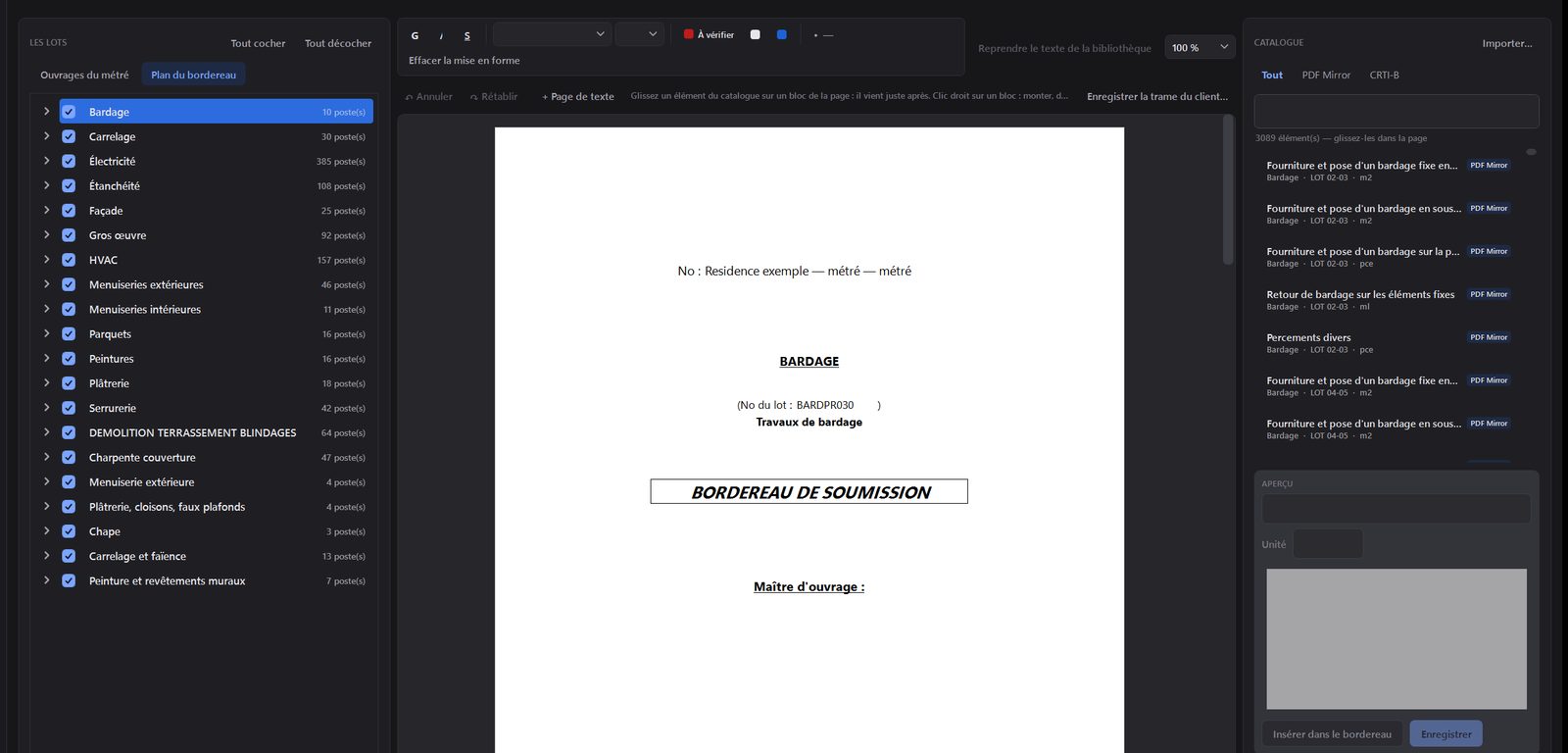
The bill of quantities being written
The bill of quantities is written like a document. Work packages on the left, the A4 page in the middle, the catalogue on the right.

Consultation · Métré and full editions

From the take-off to the tender dossier, then to the comparison of tenders.

  • A bill of quantities written like a document: the work packages on the left, the A4 page in the middle, the catalogue on the right.
  • The plan's quantities join their items, and each line says where it lands, or why it finds nothing.
  • In CRTI-B format for Luxembourg, as a DPGF for France, as a PDF with contents and bookmarks, or as an Excel workbook for the contractor to fill in.
  • Tenders are compared item by item: lowest in green, highest in red, the gap to the median as a percentage.

QRPair the iPhone with the workstation, onceno account

📐Living room · 6.42 × 5.05 · ceiling 2.584 walls

🚪Door 93 × 204 · Window 140 × 135 · sill height 952 openings

→The survey reaches the workstation and becomes the planwalls, openings, floor

Each surveyed room becomes its walls, its doors and windows, its floor and its furniture.

Survey · iPhone and iPad

Measure on site, find the plan at the office.

  • The Survey app draws each room on site: walls, thicknesses, doors, windows, ceiling height.
  • Paired by QR code, no account: the survey goes straight from the device to your workstation.
  • The survey becomes a PDF plan to scale, which Measure quantifies and Build turns into a building, room by room.
The print window with its title block
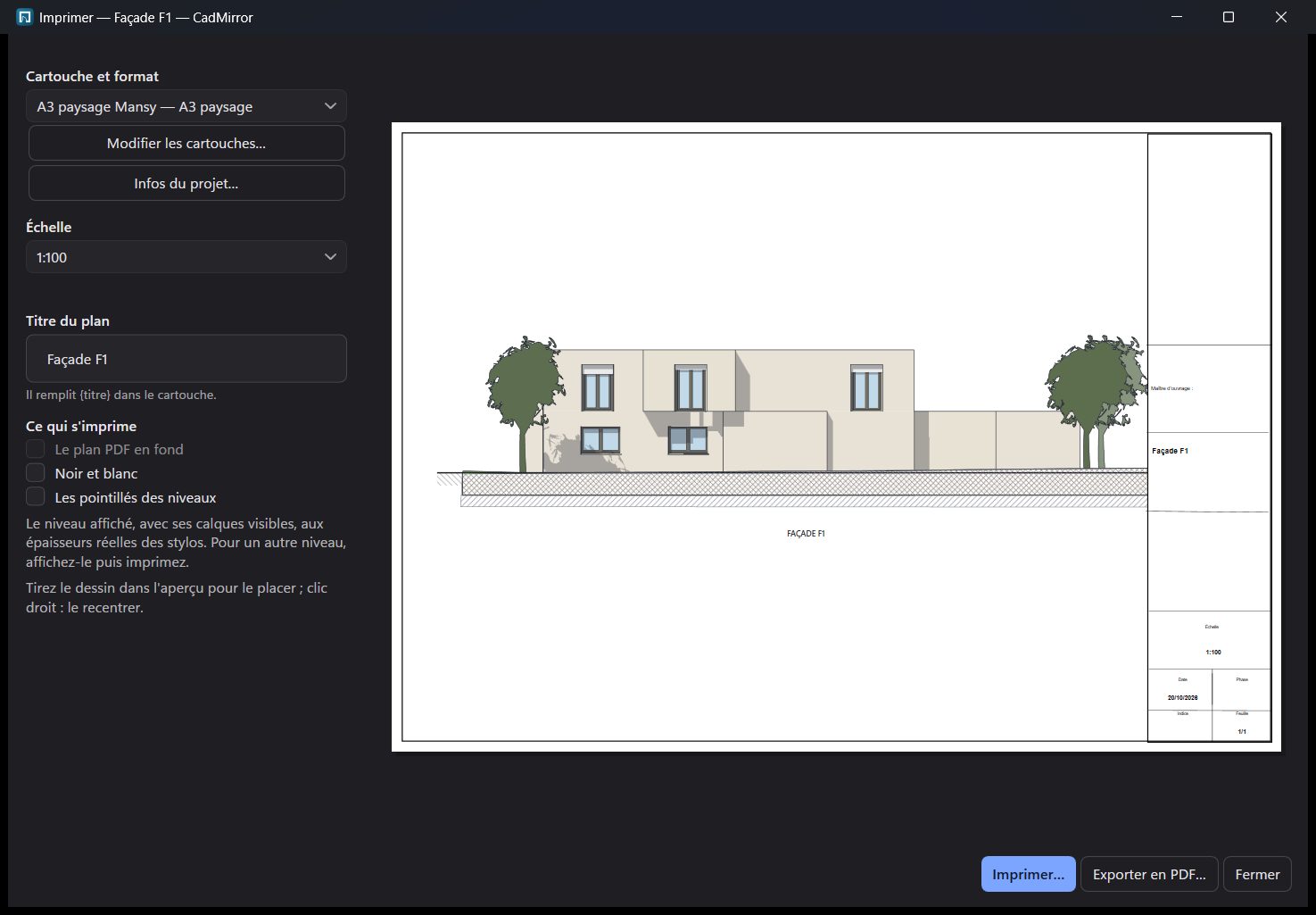
To scale, with the title block. The elevation at 1:100 on landscape A3, ready to print or export to PDF.

Print · full edition

The plan comes out at the exact scale, with your title block.

  • Your title blocks, one per format from A4 to A0, drawn with the mouse, with logo, photos and project variables.
  • To paper scale from 1:10 to 1:2000, or fitted to the sheet; pens print at their real thickness.
  • Black and white in one click: each material keeps its grey.
  • Vector PDF export, and the original plan is never replaced.

Why CadMirror

A building tool that keeps your plans at home.

590 €

Per year, all included

Build, the 3D, the take-off, the tender and the surveys in a single yearly subscription. No optional module, no account to create.

0 bytes

Your plans stay with you

Drawing, 3D, take-off and tender happen on your computer. AI features are optional and use your own keys.

PDF

The original plan intact

The project lives next to the plan, take-offs are standard annotations: the architect's document is never rewritten.

S.à.r.l.

A publisher with a name

Software signed in the name of AMS STUDIO S.à.r.l., Luxembourg, and a human who answers at contact@ams-studio.lu.

Pricing

Two plans, the whole software in each.

Download CadMirror and try it on your own plans, with no time limit: in demo mode, everything works, but nothing is saved or exported. A licence unlocks saving, exports and the bill of quantities.

Demo

0 €

  • The whole software, on your own plans, with no time limit.
  • Nothing is saved: no saving of the project, no take-off book, no Excel, CRTI-B or DPGF export.
  • No account, no credit card: install it, try it.
Download

Pro

590 €excl. VAT · per year

  • All of CadMirror, for one named person: Build, 3D, sections, elevations and realistic rendering.
  • Measure and Consultation: take-off on the plan and from the model, CRTI-B bill of quantities, DPGF, tender comparison.
  • Surveys from the iPhone or iPad, and printing to scale with your title blocks.
  • Updates included while the subscription runs; licence key by email within seconds.
Buy the Pro licence

Business

490 €excl. VAT · per seat · per year

  • All of Pro, on every enrolled seat, three seats minimum.
  • Enrol, revoke, restore a seat from the administration, without writing to us.
  • The number of seats is chosen at checkout; one yearly invoice for all seats, intra-EU VAT.
Buy — choose the number of seats

Do you have PDF Mirror Métré?

Your first year of CadMirror Pro is free, once per PDF Mirror Métré or Business Métré licence. Install CadMirror, then Settings › Licence › “I have a PDF Mirror Métré licence”. After that, the subscription continues at half price, 295 € excl. VAT per year, and nothing is charged before the end of the free year.

You keep your PDF Mirror Métré licence. Your take-offs, saved in your PDFs, open as they are; your labels, trades and prices are carried over at first launch.

No risk

Refunded on simple request within thirty days of purchase. The subscription can be cancelled at any time for the next term; at the end, CadMirror returns to demo mode and your projects remain intact and readable.

Prices excluding VAT, VAT according to your country; the invoice shows your company's name and VAT number.

The Mirror Suite

CadMirror joins the family. Same house, same rule: your files stay with you.

Windows software signed by AMS Studio, Luxembourg, designed for freelancers and small teams who want tools they own.

FAQ

What people already ask us.

Can I try it before buying?

Yes, with no time limit. Download CadMirror: without a licence, it opens in demo mode. Everything works on your own plans, but nothing is saved or exported. A licence bought later unlocks everything, without reinstalling.

I have a PDF Mirror Métré licence: what happens?

You receive the first year of CadMirror Pro free, once per licence: in CadMirror, Settings › Licence › “I have a PDF Mirror Métré licence”. After that, the subscription continues at half price, 295 € excl. VAT per year. You keep your PDF Mirror Métré licence, and your take-offs open in both programs.

What happens if I stop the subscription?

Your plans, projects and take-offs remain yours: they are files on your computer, and take-offs are inside your PDFs. CadMirror returns to demo mode: everything stays readable, nothing is altered, and you pick up where you left off the day you subscribe again.

Will I lose my labels and areas?

No. Areas are saved in your PDFs themselves: CadMirror reads them back as they are. Your labels, families, styles, trades, prices, client records and catalogues are carried over at first launch on the same computer, or through a transfer file for another computer.

Is the architect's plan modified?

Never. The Build project lives in a file next to the PDF, and take-offs are standard annotations. The drawn plan is printed or exported to a new PDF.

Can I get a refund?

Yes: the first subscription period is refunded on simple written request to contact@ams-studio.lu within thirty days of purchase.

Do I need an AI key?

No. Everything works without one. Automatic plan reading by Claude and AI perspectives are optional and use your own key; without a key, the wall wand recognises walls without sending anything.

What hardware do I need?

A PC running Windows 10 or 11. 3D and realistic rendering benefit from a recent graphics card, but an office laptop is enough to draw and take off.